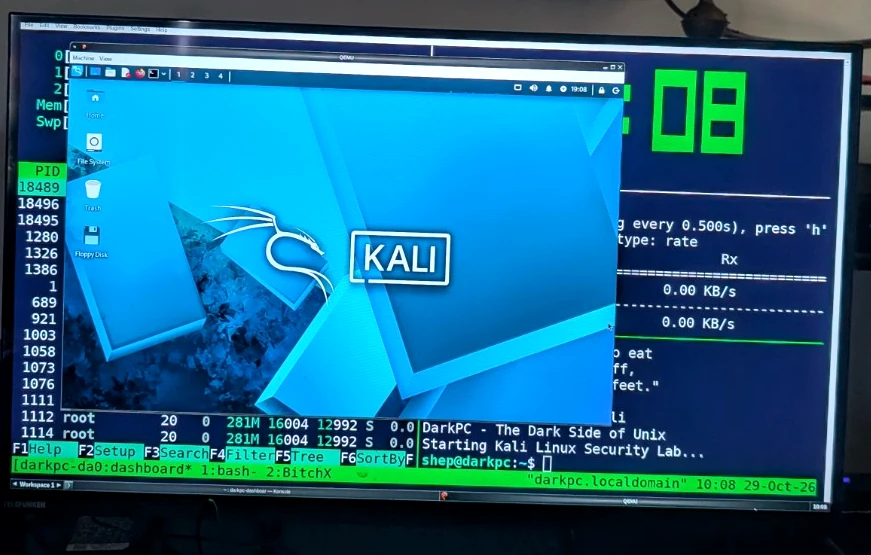
Yes, it works! Our working DarkPC ran Kali Linux 2026.3 inside Slackware 15.0 using QEMU 10.2.4, with functional networking, package upgrades, snapshots and a one-command launcher. This is a tested case study, not a claim to be the first person ever to do it.
1. Check the Slackware host
Use a normal, supported x86-64 Slackware 15.0 installation, a working graphical desktop and sufficient spare SSD space. Our test machine had about 15 GiB of usable RAM and 61 GB free on its Slackware partition before we downloaded the VM. The Kali archive expanded to about 15.5 GiB on disk, and software updates grew the host's used space further.
free -h
df -h /
grep -m1 -o vmx /proc/cpuinfo
lsmod | grep kvm
ls -l /dev/kvm
Look for vmx on an Intel processor (or svm on AMD), and for loaded kvm_intel/kvm_amd modules. Virtualization support may need to be enabled in your BIOS/UEFI. Do not modify your existing Windows or Slackware partitions.
Storage matters. A QCOW2 disk can report an 80 GiB virtual capacity while occupying much less physical disk space. Guest free space is not host free space. Keep checking df -h / on Slackware while installing or updating Kali.
2. Install the SlackBuild prerequisites
We used sbopkg against the SlackBuilds.org 15.0 tree. QEMU required device-tree-compiler and we installed the optional libslirp for user-mode NAT networking. Build dependencies may change after this article's date; always check the current SlackBuild QEMU README.
su -
sbopkg -r
sbopkg -i device-tree-compiler
sbopkg -i libslirp
These commands are run as root for installing packages. Exit the root shell once QEMU is ready; we will run Kali as an ordinary user.
3. Build QEMU with x86-64 + SLIRP
The default SlackBuild compiles multiple CPU emulators. We limited this build to the x86-64 system emulator and explicitly enabled SLIRP networking using an sbopkg queue file:
printf '%s\n' 'qemu | SLIRP=yes TARGETS=x86_64-softmmu' > /var/lib/sbopkg/queues/darkpc-qemu.sqf
sbopkg -i darkpc-qemu.sqf
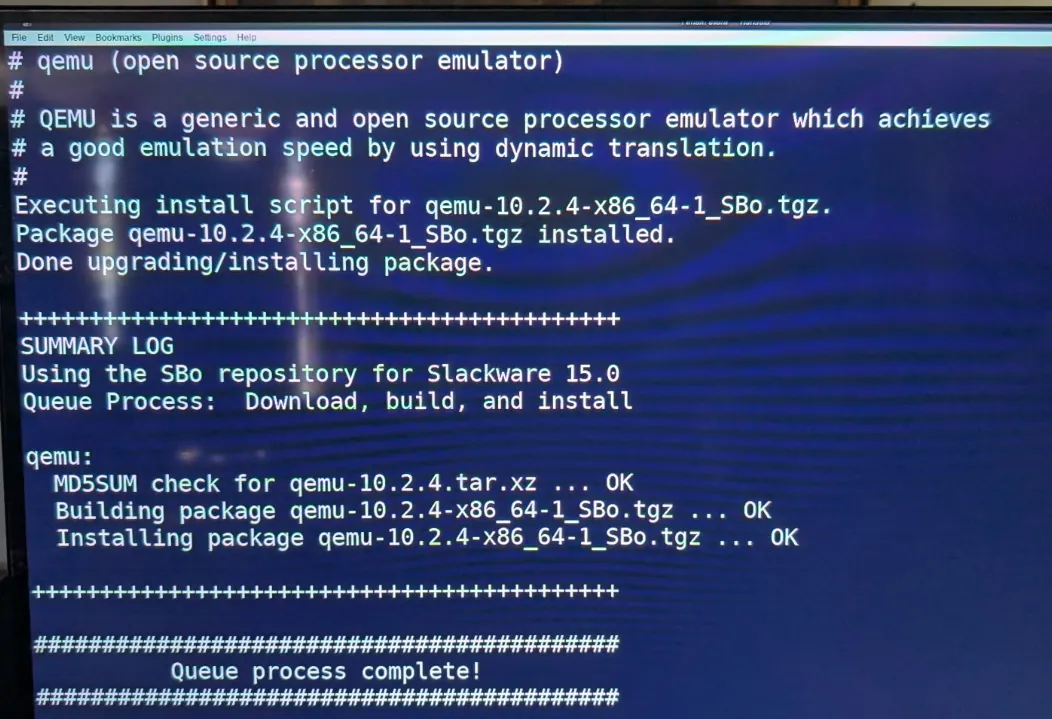
When prompted, select Q to use the queue-file options, then P to proceed with the build. Our build installed qemu-system-x86_64 and qemu-img version 10.2.4 successfully.
4. Fix KVM access for the normal user
The installed SlackBuild included /lib/udev/rules.d/65-kvm.rules, which granted the users group access to /dev/kvm. On our machine, the rule existed but had not yet been applied. While still root:
qemu-system-x86_64 --version
qemu-img --version
cat /lib/udev/rules.d/65-kvm.rules
udevadm control --reload-rules
udevadm trigger --action=change /sys/class/misc/kvm
udevadm settle
ls -l /dev/kvm
We got crw-rw---- 1 root users ... /dev/kvm. Your account must belong to the permitted group. Leave the root shell, then check that KVM access works without elevated privileges:
exit
test -r /dev/kvm && test -w /dev/kvm && echo "KVM access OK"
Security tip: do not use chmod 666 /dev/kvm. Give access only to a suitable local group. Running QEMU as a regular user helps limit accidental damage.
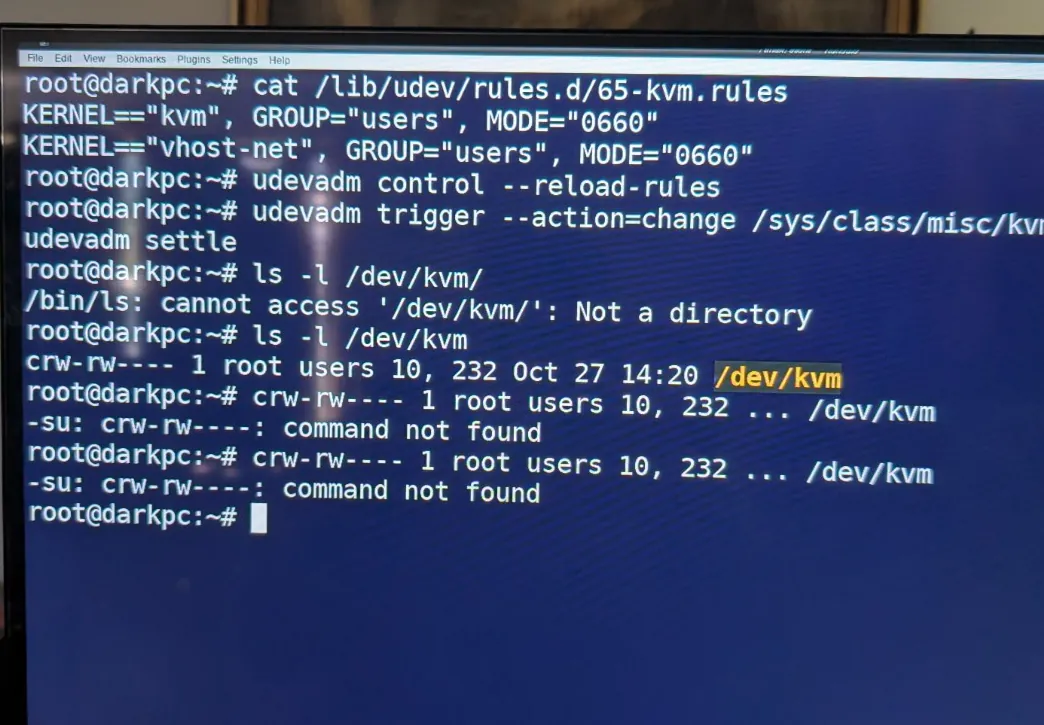
/dev/kvm accessible by the users group.5. Install 7-Zip and download Kali's QEMU image
We used the Slackware 15.0 7-Zip SlackBuild, which required UASM on our setup:
su -
sbopkg -i UASM
sbopkg -i 7zip
exit
7z | head -n 3
The following URLs are pinned to the exact Kali 2026.3 image used in this test, not a moving “latest” link. Download the archive and verify its SHA-256 checksum against the published checksum list before extraction:
mkdir -p ~/vms/kali
cd ~/vms/kali
wget -c https://archive.kali.org/kali-images/kali-2026.3/kali-linux-2026.3-qemu-amd64.7z
wget -O SHA256SUMS https://archive.kali.org/kali-images/kali-2026.3/SHA256SUMS
grep ' kali-linux-2026.3-qemu-amd64.7z$' SHA256SUMS | sha256sum -c -
Verification note: comparing against a checksum list from the same download host detects mismatches, but cryptographic authenticity also depends on the trustworthiness of that list. Kali also publishes detached signatures for its checksum files; verify those when higher assurance is required.
6. Extract the QCOW2 virtual disk
cd ~/vms/kali
df -h .
7z l kali-linux-2026.3-qemu-amd64.7z | tail -n 20
7z x kali-linux-2026.3-qemu-amd64.7z
qemu-img info kali-linux-2026.3-qemu-amd64.qcow2
Our archive was around 3.6 GiB, while the extracted disk initially occupied around 15.5 GiB. qemu-img info reported an 80.1 GiB virtual disk in qcow2 format. Those numbers are from our hardware and the 2026.3 image; other releases differ.
7. Boot Kali directly inside Fluxbox
Run the following command as your normal Slackware user, from a graphical terminal. It gives Kali two virtual CPU cores, 4 GiB RAM, a virtio disk and QEMU user-mode networking. Our Slackware QEMU build supported the GTK display backend.
cd ~/vms/kali
qemu-system-x86_64 \
  -enable-kvm \
  -cpu host \
  -smp 2 \
  -m 4096 \
  -drive file=kali-linux-2026.3-qemu-amd64.qcow2,format=qcow2,if=virtio \
  -nic user,model=virtio-net-pci \
  -display gtk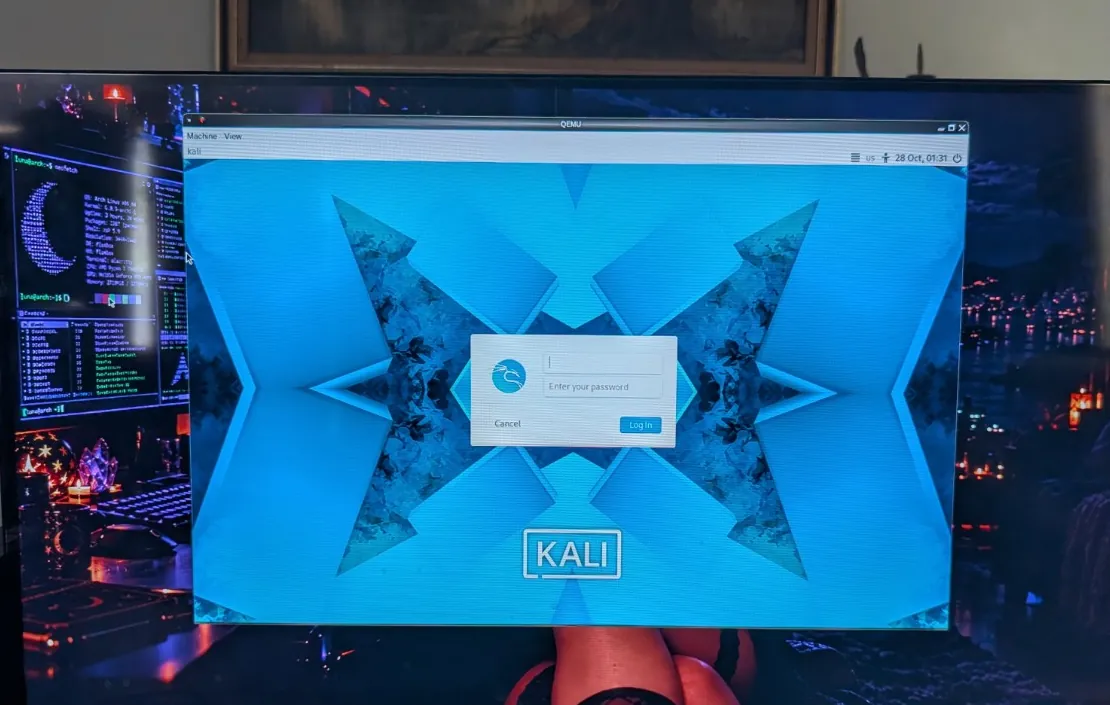
The prebuilt Kali login is kali / kali. Change that default password on your first login. Our first launch reached the graphical desktop and accessed the internet successfully.
Network isolation: -nic user provides outbound NAT-style networking. It is convenient for updates, but it is not an isolated attack lab. For an offline exercise, remove that option and use -nic none instead. Only test machines and networks you own or have explicit permission to assess.
8. Verify tools, snapshot and update
Inside Kali, change your password, verify common tools and preview the package-upgrade plan:
passwd
command -v nmap wireshark msfconsole
sudo apt update
sudo apt-get --assume-no full-upgrade
sudo apt-get -s full-upgrade | grep '^Remv'
On DarkPC, nmap, wireshark and msfconsole were already present. Our upgrade preview proposed 887 upgrades, 26 new packages and five removals; these numbers change over time. Inspect removals before proceeding.
We shut down Kali cleanly before creating an internal QCOW2 snapshot on the Slackware host:
sudo poweroffcd ~/vms/kali
qemu-img snapshot -c before-upgrade kali-linux-2026.3-qemu-amd64.qcow2
qemu-img snapshot -l kali-linux-2026.3-qemu-amd64.qcow2
df -h /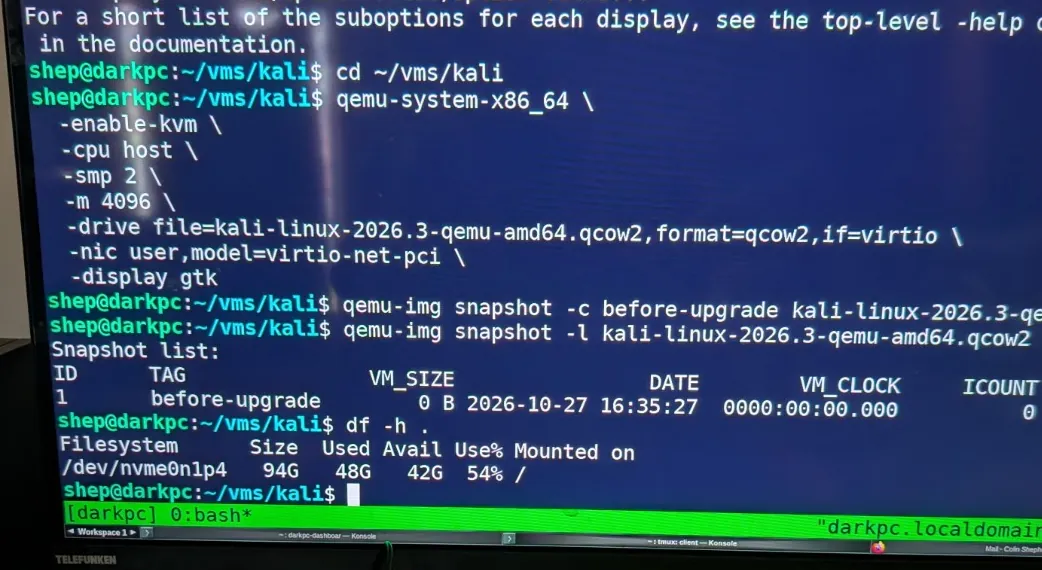
before-upgrade snapshot, created while Kali was powered off.A QCOW2 internal snapshot provides a useful rollback point. It is not an independent backup; if the image is lost or corrupted, the snapshot goes with it. Keep a separate copy of important files.
After checking host free space, restart Kali using the same QEMU command and update it:
sudo apt update
sudo apt full-upgrade
sudo dpkg --audit
sudo apt-get check
df -h /
sudo reboot
Our post-upgrade checks completed cleanly and Kali booted back into its graphical desktop. On the Slackware host, free space had fallen from about 42 GB to 32 GB through VM growth and updates. That's why monitoring the host matters.
9. Make the one-command start-kali launcher
No need to type the long QEMU line every time. On Slackware, create an executable launcher with a flock guard, so two copies of this script don't try to write to the same virtual disk at once. Ensure Kali is shut down before testing the launcher.
mkdir -p ~/bin
cat > ~/bin/start-kali <<'EOF'
#!/bin/bash
cd "$HOME/vms/kali" || exit 1
exec 9>"$HOME/vms/kali/.start-kali.lock"
if ! flock -n 9; then
    echo "DarkPC: Kali is already running!"
    exit 1
fi
echo "DarkPC - The Dark Side of Unix"
echo "Starting Kali Linux Security Lab..."
exec qemu-system-x86_64 \
  -enable-kvm \
  -cpu host \
  -smp 2 \
  -m 4096 \
  -drive file=kali-linux-2026.3-qemu-amd64.qcow2,format=qcow2,if=virtio \
  -nic user,model=virtio-net-pci \
  -display gtk
EOF
chmod +x ~/bin/start-kali
~/bin/start-kali
If ~/bin is already in your PATH, you can simply type start-kali from the terminal. If not, add it to your shell's PATH or use ~/bin/start-kali. All launches of this image should go through the guarded script; manually starting QEMU by another command bypasses that guard.
10. Add Kali to the Fluxbox right-click menu
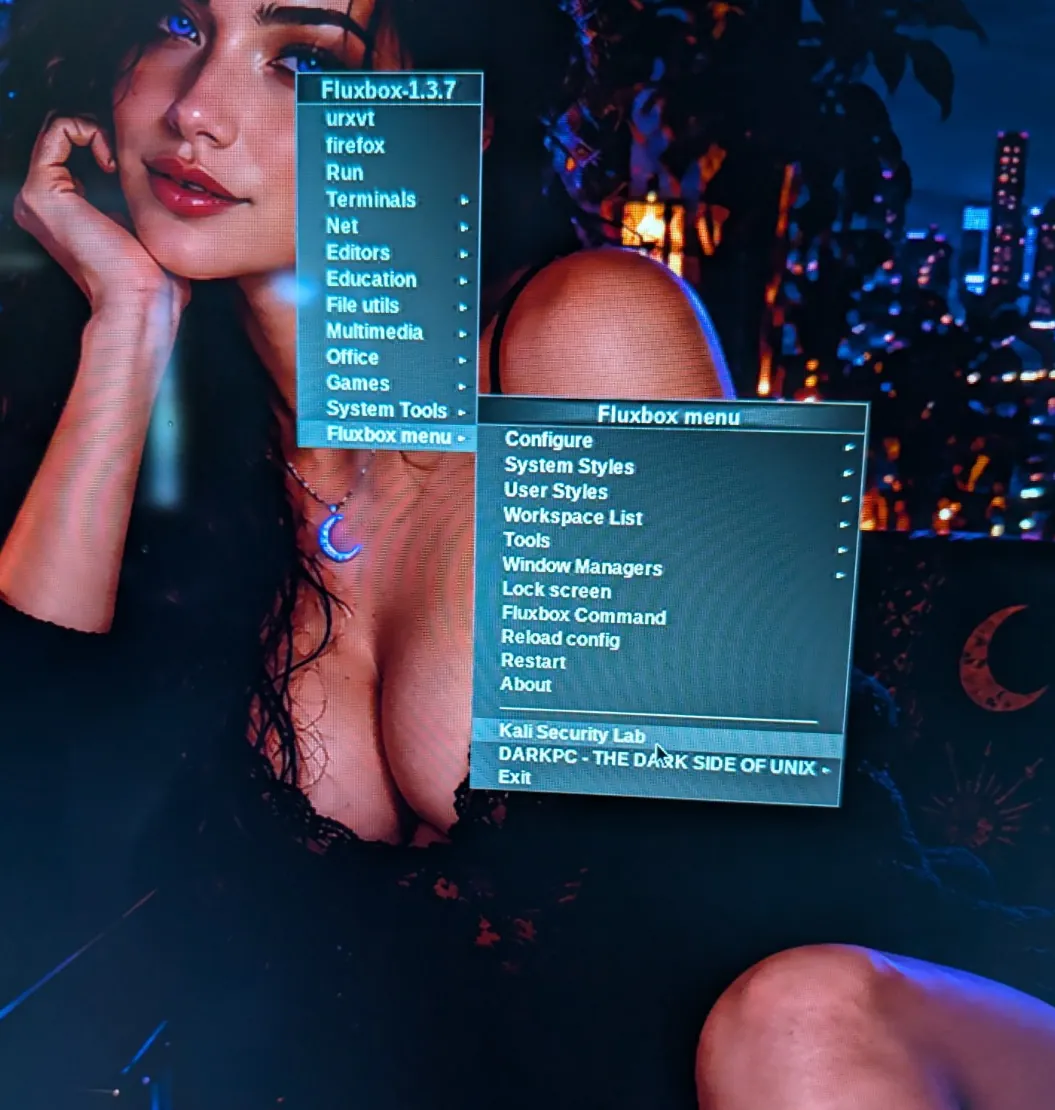
Our existing ~/.fluxbox/menu included [include] (~/.fluxbox/usermenu). That makes it easy to add custom entries without rewriting the main menu. Back up ~/.fluxbox/usermenu, then add this entry (replace shep with your own account name):
# Add this line to ~/.fluxbox/usermenu, changing the path for your account:
[exec] (Kali Security Lab) {/home/shep/bin/start-kali}
Reload the Fluxbox configuration, right-click the desktop and select Fluxbox menu → Kali Security Lab. It launched successfully on our Dell.
11. Keep the host healthy
After verifying Kali boots reliably and making a separate backup, you can reclaim the downloaded archive (the extracted QCOW2 is the actual running virtual machine):
# After confirming the VM works and you have a backup:
rm -i ~/vms/kali/kali-linux-2026.3-qemu-amd64.7z
Do not remove the .qcow2 file or your snapshot. Watch df -h / on Slackware when installing more packages. Consider an external SSD if you intend to maintain many large VM images.
12. Your first permission-safe security exercise
Once Kali is working, start by scanning the guest itself. This introductory Nmap command targets only localhost:
# Inside Kali: test Nmap against Kali itself
nmap -sV 127.0.0.1
Wireshark is useful for learning to inspect packets captured on your own systems. Metasploit can be explored in an intentionally vulnerable, isolated practice environment—never by scanning or attacking arbitrary hosts.
Troubleshooting
KVM permission denied / failed to initialize KVM
Check ls -l /dev/kvm, your groups with id, and whether your CPU virtualization is enabled in firmware. Revisit the udev rule in step 4. On other Slackware builds the group may be called kvm rather than users.
QEMU says the display backend is missing
Use qemu-system-x86_64 -display help to check supported backends. Use a backend your QEMU build actually supports, or rebuild QEMU with the required GUI libraries.
QEMU cannot open the image / image locked
Shut down the existing Kali instance. Never launch two write-enabled VMs against the same QCOW2. The launcher lock prevents duplicate launches through the script, but not separately started QEMU processes.
Kali says there is plenty of space, Slackware says otherwise
Kali's filesystem reports free capacity inside the virtual disk. Slackware reports actual host capacity. A growing QCOW2 plus snapshots and downloads can fill Slackware despite guest free space. Monitor df -h / on the host.
Upgrade proposes removing important packages
Stop and inspect proposed removals with apt-get -s full-upgrade | grep '^Remv'. Keep a working snapshot and backup before major Kali rolling updates. Do not blindly confirm destructive dependency changes.
Official resources
- SlackBuilds.org — QEMU for Slackware 15.0
- SlackBuilds.org — libslirp
- Kali documentation — Import Pre-Made QEMU VM
- Kali 2026.3 release archive and checksums
- Kali documentation — Default credentials
☾ DarkPC.NET — The Dark Side of Unix.
Built on Slackware. Tested on a real Dell. The cursor never sleeps.